Factor-based investing helps investors build systematic strategies based on specific stock characteristics. Our Backtester allows users to test investment strategies by selecting multiple factors like Momentum, Value, Growth, and Fundamentals
DocumentIntroduction
Factor-based investing helps investors build systematic strategies based on specific stock characteristics. Our Backtester allows users to test investment strategies by selecting multiple factors like Momentum, Value, Growth, and Fundamentals.
Among these, we’ll explore how to use the Value Factor in our backtester to build and analyze a portfolio.
If you haven’t read our blog on the Momentum Factor yet, we recommend reading it first. It provides foundational insights on how our backtester works and will help you understand how different factors interact.
Step 1 : Navigating to the Backtester
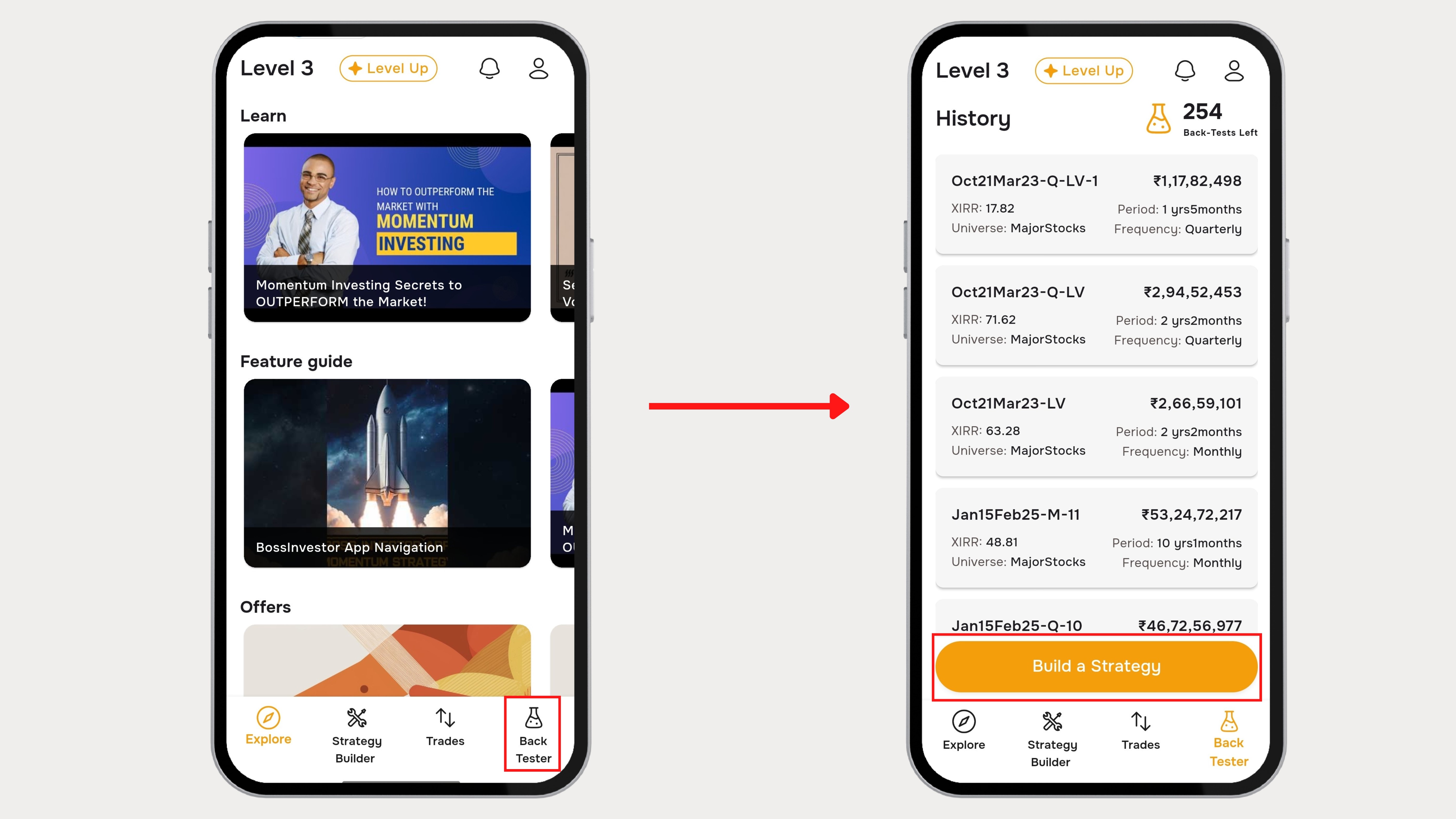
- Open the Boss Investor App.
- Navigate to the Backtester section from Bottom Bar
- Tap on “Build a Strategy”
Step 2 : Selecting the Value Factor
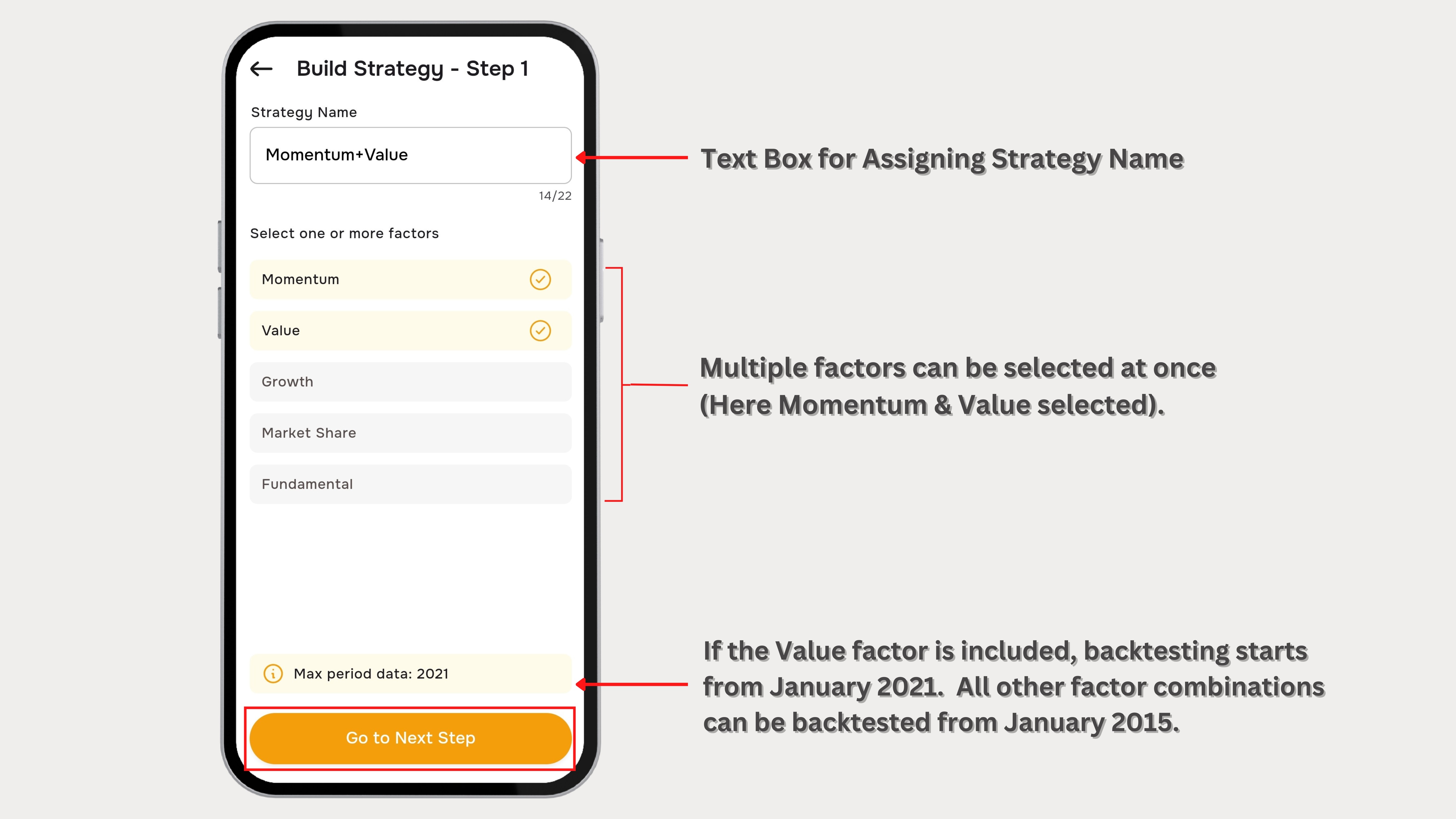
- Assign the Name for the Strategy
- Momentum remains pre-selected.
- Check the box next to Value under the factor selection panel.
- Tap “Go to Next Step” to confirm your selection.
Note:The Momentum Factor is always pre-selected and cannot be removed, but users can add additional factors like Value, Growth and Fundamentals for deeper analysis.
Step 3 : Understanding the Value Factor Parameters
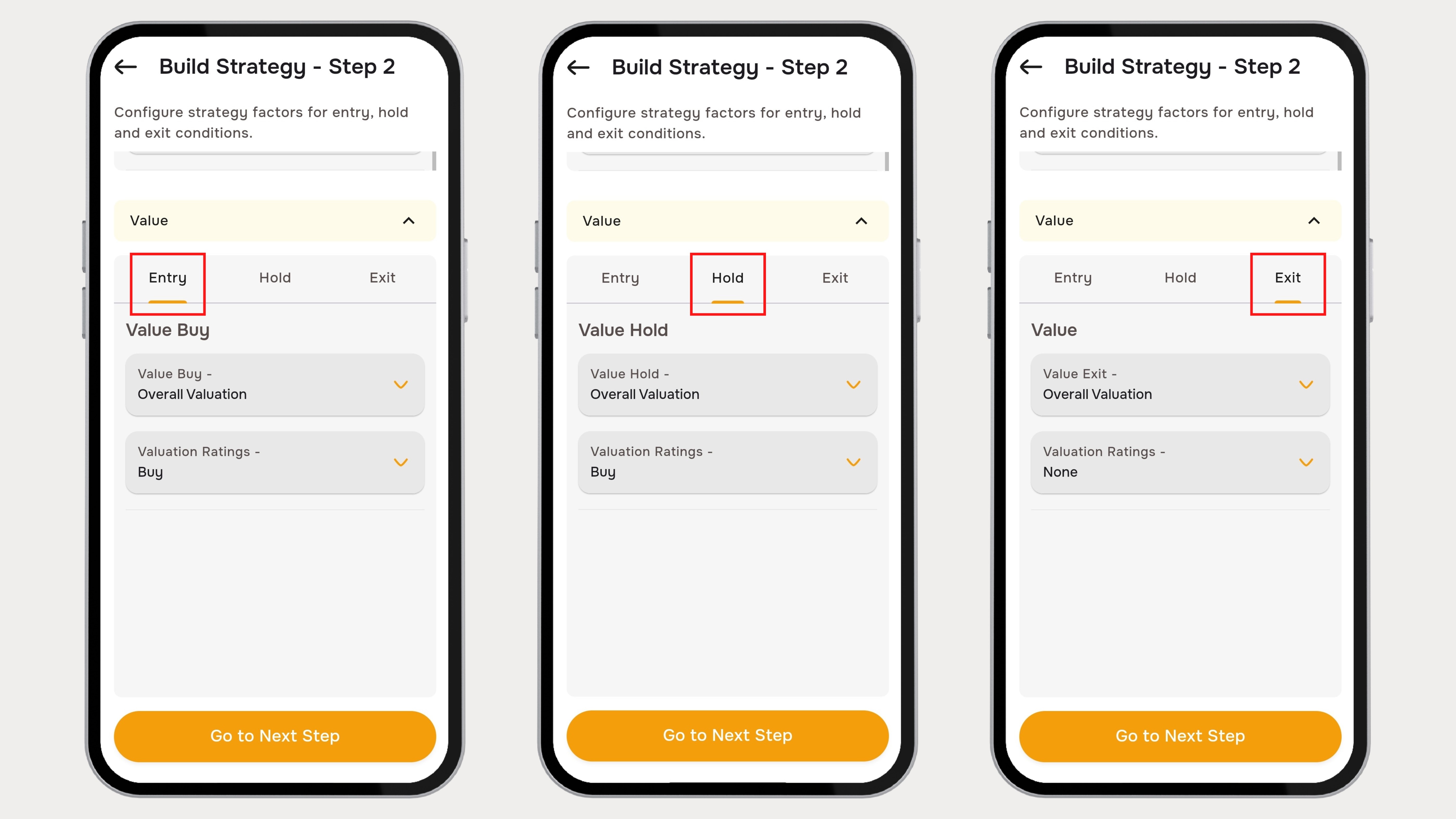
After selecting the Value Factor, the user is redirected to the Parameters selection page. This section contains three main criteria settings :
- Entry Criteria
- Hold Criteria
- Exit Criteria
Each of these buttons allows users to define specific parameters and variables that control how stocks are selected, held, and exited from the portfolio.
Step 4 : Defining Entry, Hold and Exit Criteria
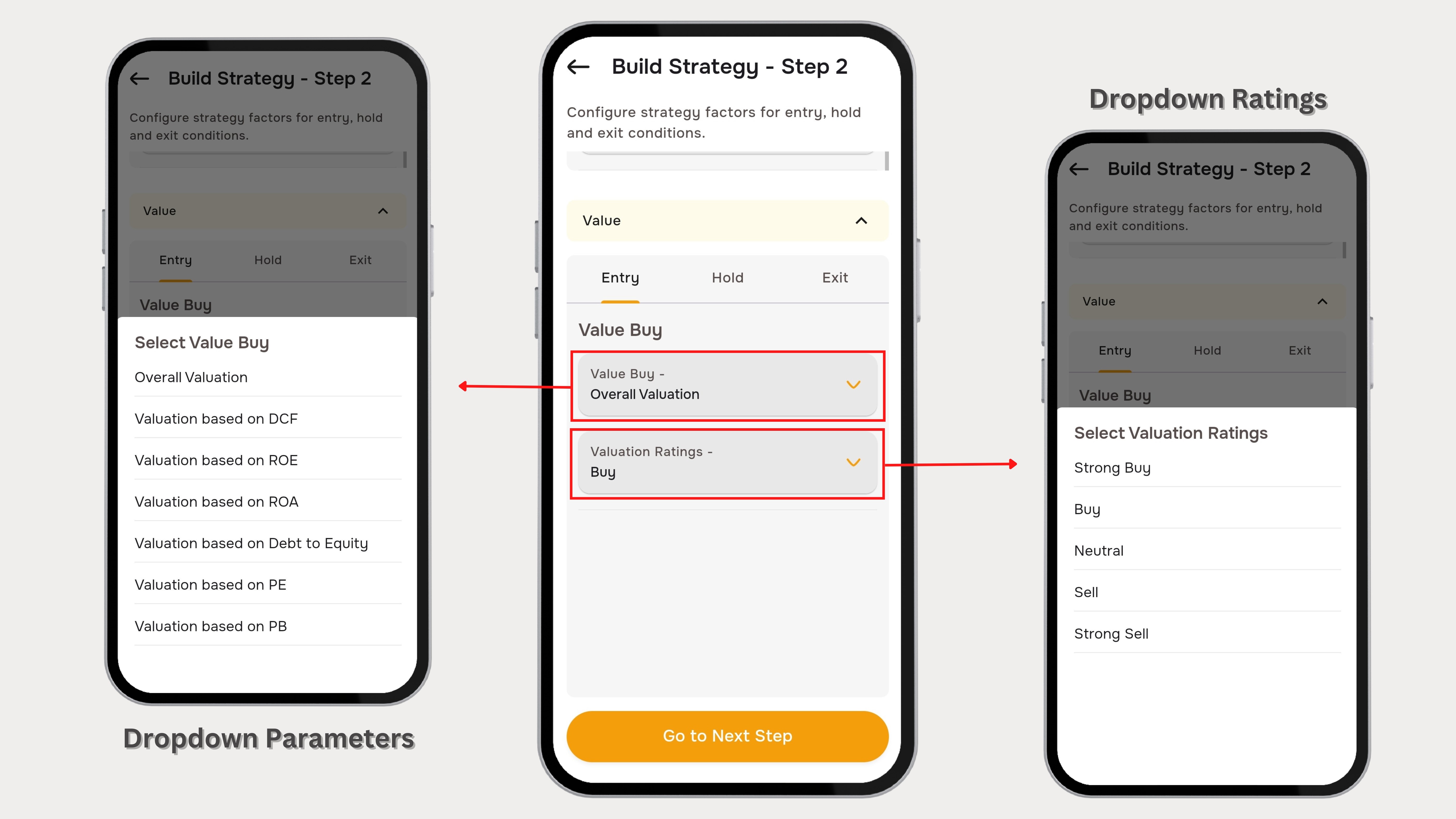
- Click on Entry, Hold, and Exit separately to view their respective parameters.
- Every parameter and variable comes with selectable dropdown values.
- Each dropdown contains multiple parameter options, such as:
- Overall Valuation
- Valuation Based on DCF
- Valuation Based on ROE etc.
- After selecting the required parameters, set the variable/ratings conditions, such as:
- Strong Buy
- Buy
- Neutral
- Sell
- Strong Sell
- Click on “Go to Next Step” to finalize the criteria.
Step 5 : Set Parameters
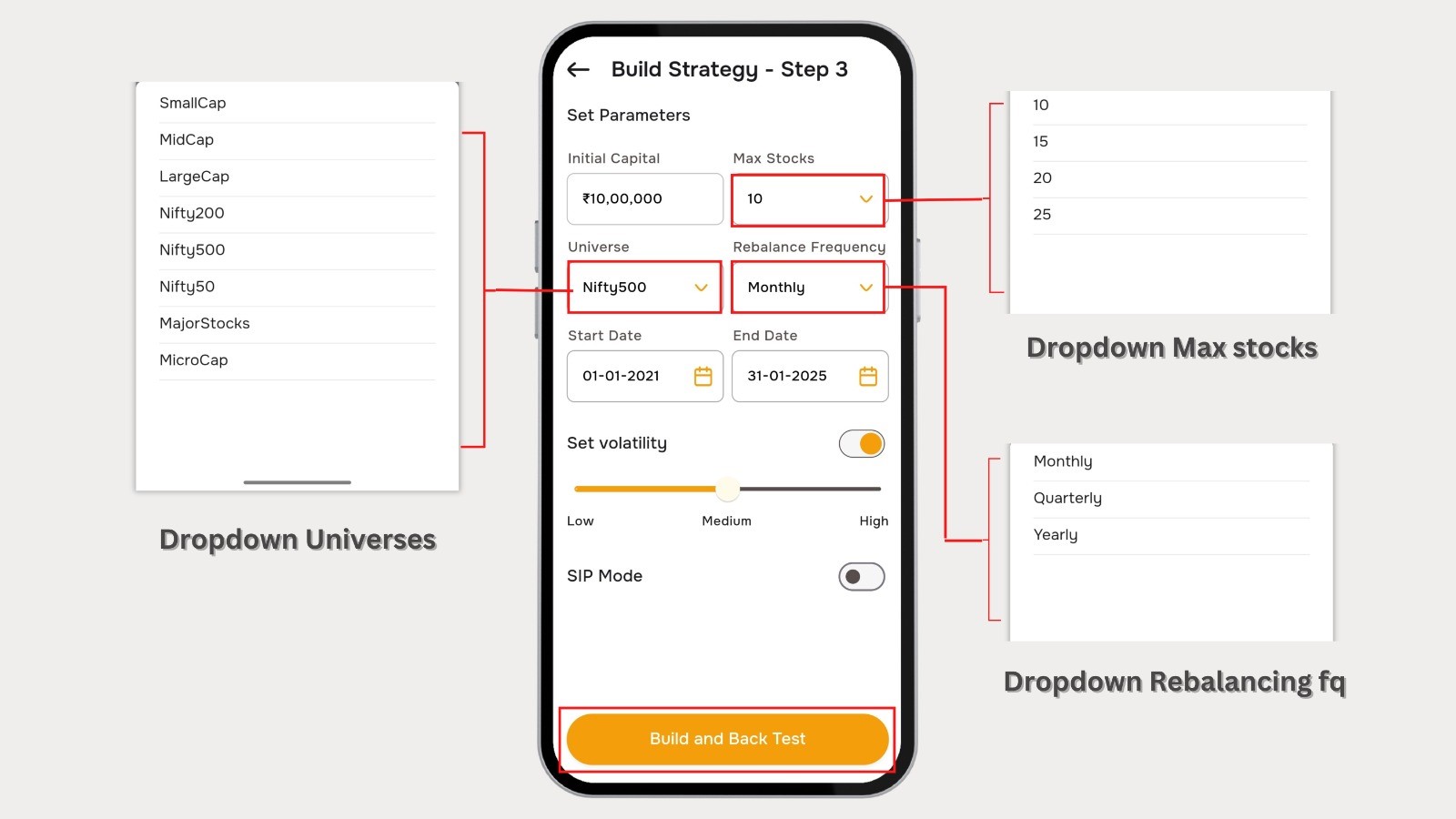
The Parameter Settings Page allows users to configure key inputs before running a backtest. This step is crucial for defining the portfolio characteristics, investment period, risk settings, and rebalancing frequency.
- Initial Capital
- Enter the starting investment amount for the backtest.
- This value represents the total capital allocated for strategy execution.
- Max Stocks
- Define the maximum number of stocks that will be included in the portfolio.
- The strategy will select up to this number of stocks based on the chosen factors.
- Universe Selection
- Choose the stock universe from which the strategy will select stocks.
- This determines the pool of stocks eligible for selection.
- Rebalancing Frequency
- Select how often the portfolio will be rebalanced to adjust holdings.
- More frequent rebalancing may lead to higher transaction costs.
- Start Date & End Date
- Select the backtest duration by setting a start and end date.
- This period determines the historical timeframe over which the strategy will be tested.
- Set Volatility
- Adjust the volatility filter using the slider.
- If enabled, this setting ensures stocks are filtered based on their volatility levels.
Build and Back Test- Tap on “Build and Back Test” to execute the strategy based on the selected parameters.
- A loading animation will appear while the backtest runs.
Step 6 : Backtested Results Page

The Results Page offers a comprehensive overview of backtesting outcomes, enabling users to analyze the performance of their selected strategies. Key components include Test Results Overview, Equity Curve, Winning & Losing Trades, and Trade Details.
- Tap on “Go To Trade Details” to access the trade details.
- Displays all active trades with entry price & date, current price & date, and percentage change.
- Past performance Summarizes returns over various periods.
Final Thoughts
The Backtester on Boss Investor empowers users to build and refine investment strategies using the Value Factor. By systematically selecting entry, hold, and exit criteria, setting key parameters, and analyzing backtest results, investors can make data-driven decisions to enhance their portfolios. Start testing today and optimize your strategy for better returns!