Value Investing Backtester Guide
Use the BossInvestor value investing backtester to test historical strategies. Select parameters, set criteria, and evaluate performance.

How do you use the value investing backtester on BossInvestor?
To use the value investing backtester, open the BossInvestor app and navigate to the backtester section to build a strategy[cite: 41]. Users select the value factor alongside the pre-selected momentum factor, define specific entry, hold, and exit criteria, configure portfolio parameters like initial capital and rebalancing frequency, and then execute the backtest to analyze comprehensive historical results[cite: 41].
Definition: A value investing backtester is a systematic digital tool used to evaluate how an investment strategy based on cheap or undervalued stock characteristics would have performed over historical market periods[cite: 41]. It allows investors to simulate rules-based trading by applying fundamental valuation metrics to past financial data to measure risk and return outcomes before committing live capital[cite: 41].
Key Takeaways
- Factor-based investing allows users to test systematic strategies by combining multiple characteristics such as momentum, value, growth, and fundamentals[cite: 41].
- The momentum factor remains pre-selected and mandatory within the platform's configuration, but additional factors like value can be layered for deeper analysis[cite: 41].
- Users can control portfolio behavior by customizing entry, hold, and exit criteria dropdowns using parameters like overall valuation, DCF valuation, and ROE ratings[cite: 41].
- Key backtest customization inputs include configuring the initial capital, maximum stock count, universe selection, rebalancing frequency, historical date range, and volatility levels[cite: 41].
- The final performance results page provides an equity curve, a summary of returns across periods, active trade details, and a breakdown of winning and losing trades[cite: 41].
Introduction
Factor-based investing helps investors build systematic strategies based on specific stock characteristics[cite: 41]. Our Backtester allows users to test investment strategies by selecting multiple factors like Momentum, Value, Growth, and Fundamentals[cite: 41].
Among these, we’ll explore how to use the Value Factor in our backtester to build and analyze a portfolio[cite: 41].
If you haven’t read our blog on the Momentum Factor yet, we recommend reading it first[cite: 41]. It provides foundational insights on how our backtester works and will help you understand how different factors interact[cite: 41].
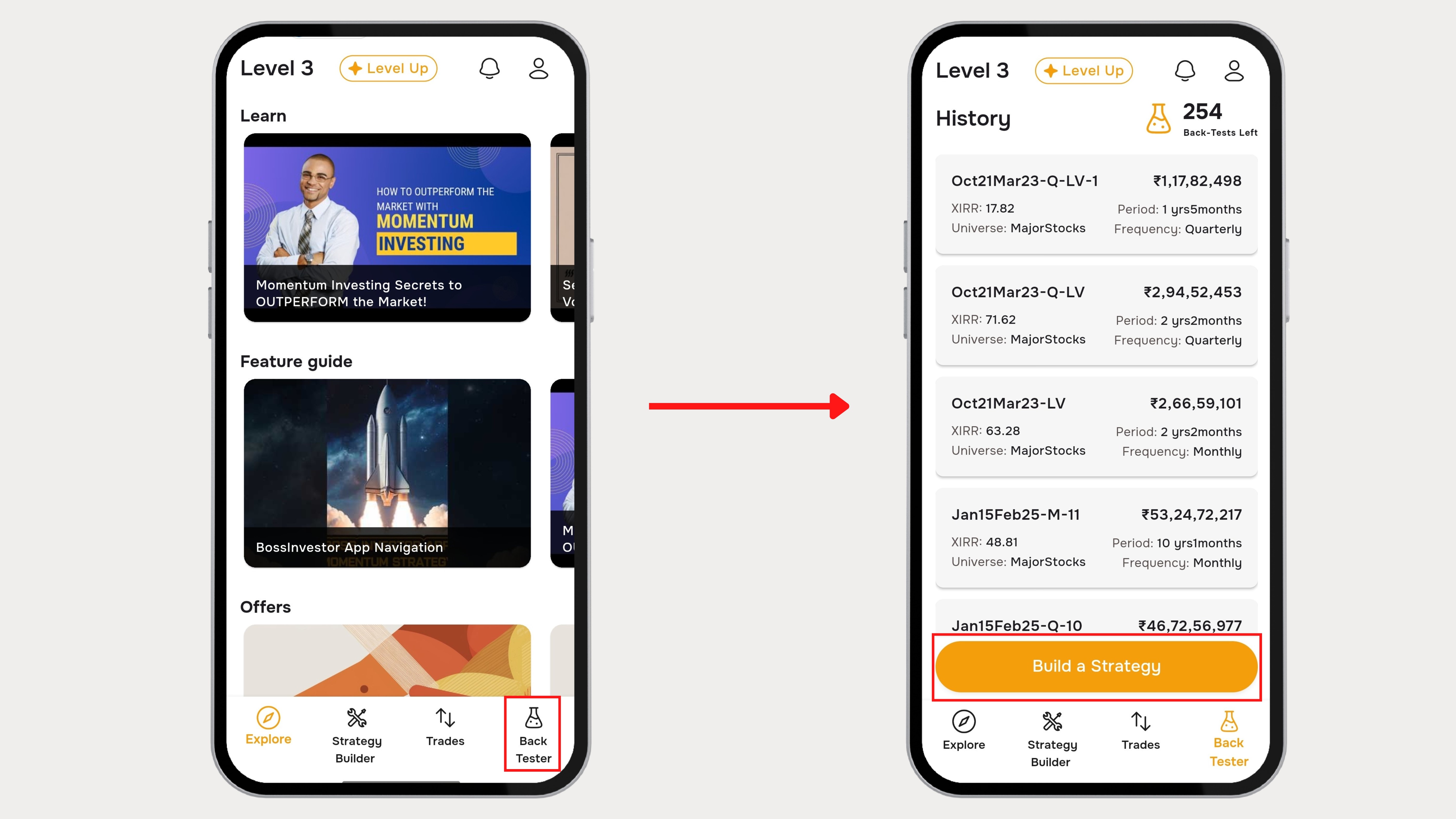
Step 1 : Navigating to the Backtester
- Open the Boss Investor App[cite: 41].
- Navigate to the Backtester section from Bottom Bar[cite: 41]
- Tap on “Build a Strategy”[cite: 41]
Step 2 : Selecting the Value Factor
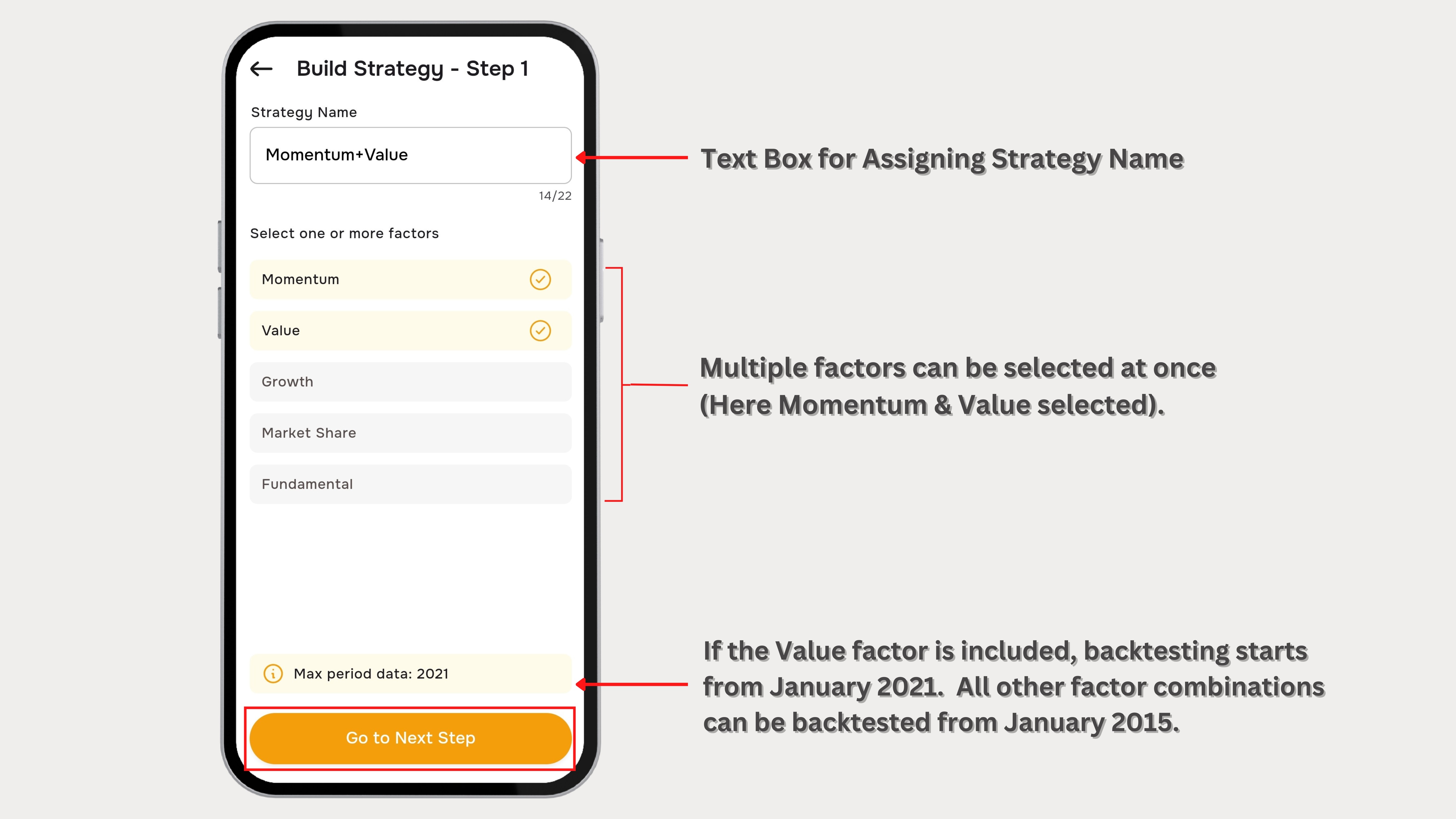
- Assign the Name for the Strategy[cite: 41]
- Momentum remains pre-selected[cite: 41].
- Check the box next to Value under the factor selection panel[cite: 41].
- Tap “Go to Next Step” to confirm your selection[cite: 41].
Note: The Momentum Factor is always pre-selected and cannot be removed, but users can add additional factors like Value, Growth and Fundamentals for deeper analysis[cite: 41].
Step 3 : Understanding the Value Factor Parameters
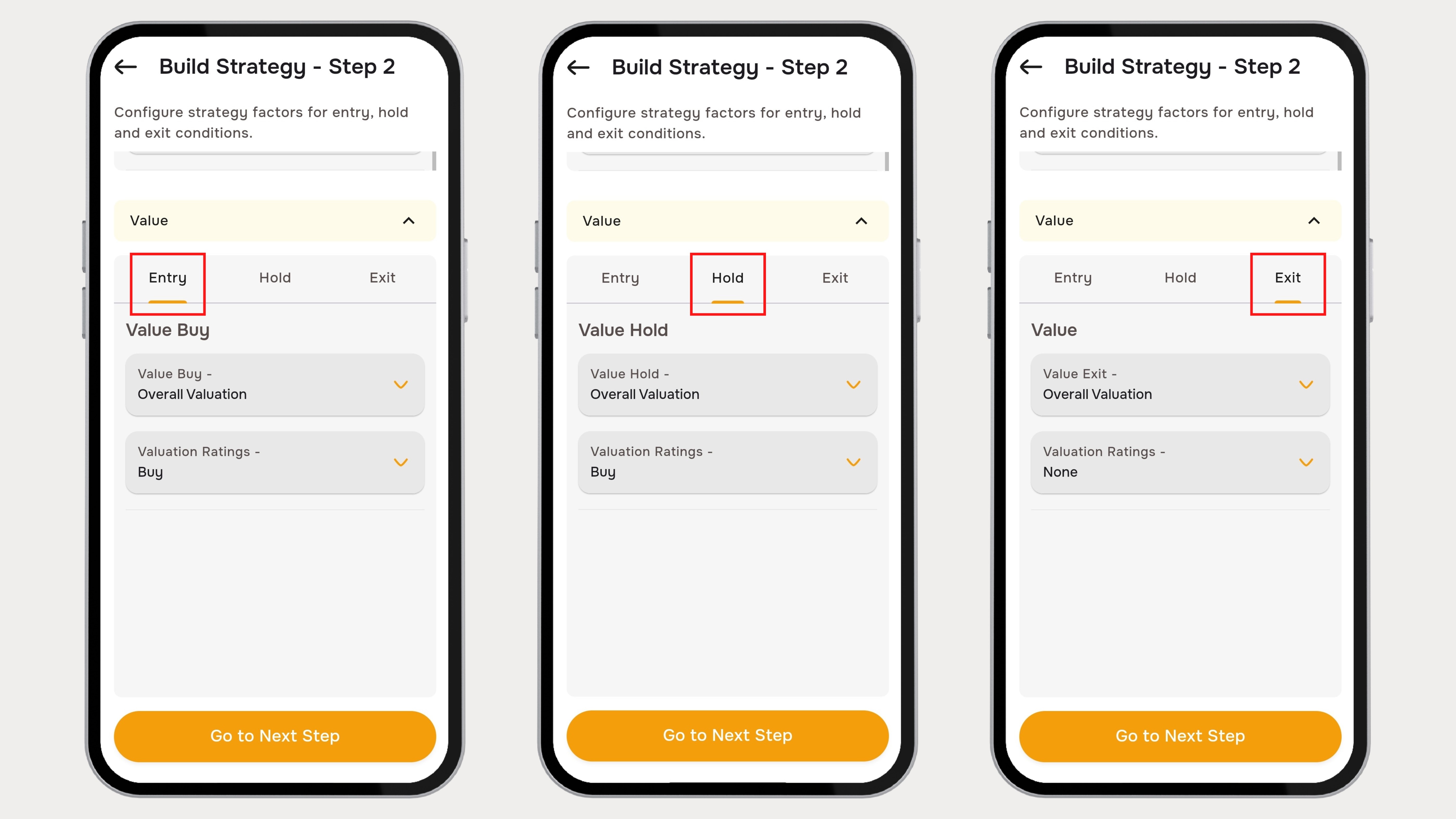
After selecting the Value Factor, the user is redirected to the Parameters selection page[cite: 41]. This section contains three main criteria settings :[cite: 41]
- Entry Criteria[cite: 41]
- Hold Criteria[cite: 41]
- Exit Criteria[cite: 41]
Each of these buttons allows users to define specific parameters and variables that control how stocks are selected, held, and exited from the portfolio[cite: 41].
Step 4 : Defining Entry, Hold and Exit Criteria
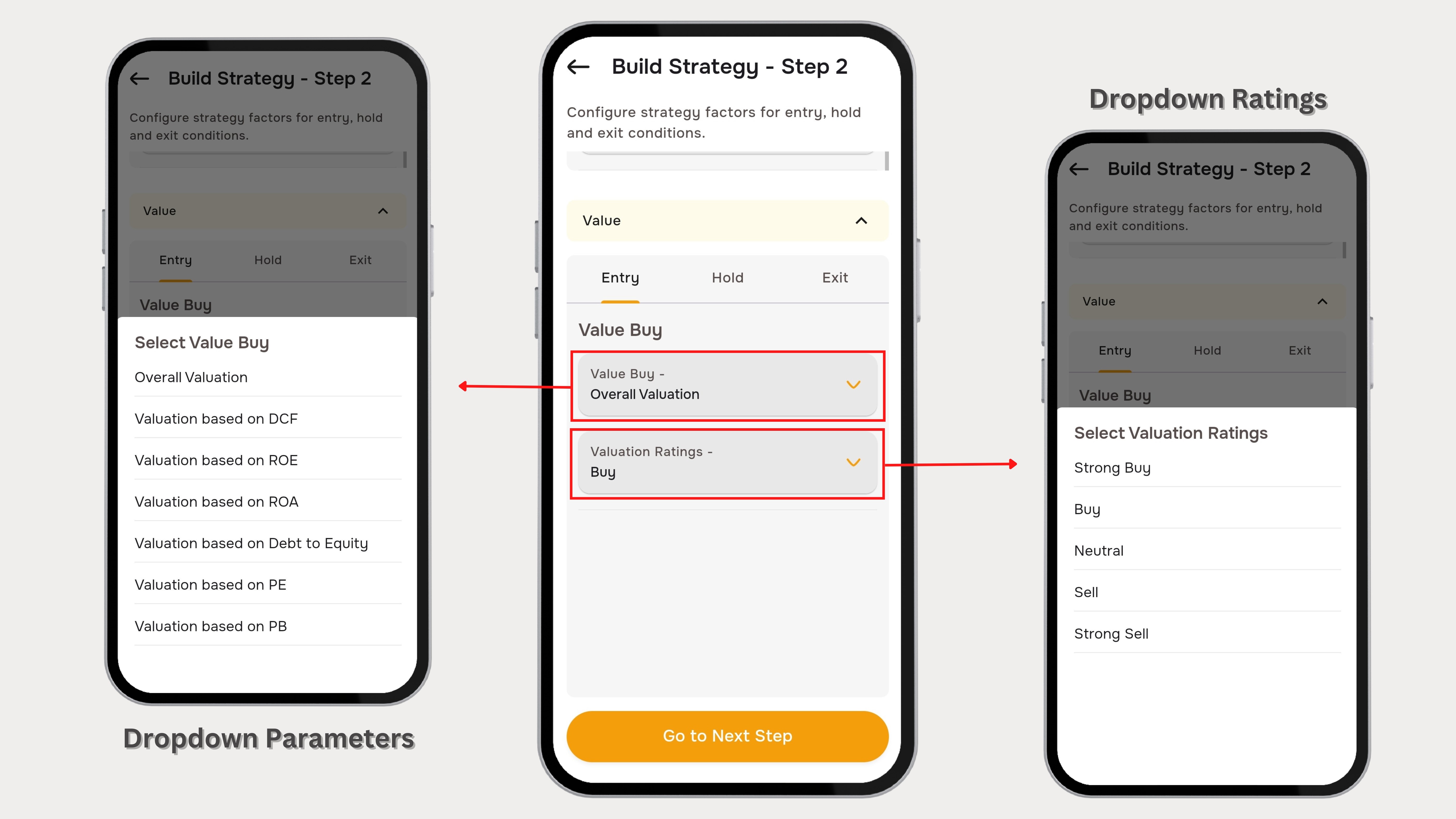
- Click on Entry, Hold, and Exit separately to view their respective parameters[cite: 41].
- Every parameter and variable comes with selectable dropdown values[cite: 41].
- Each dropdown contains multiple parameter options, such as:[cite: 41]
- Overall Valuation[cite: 41]
- Valuation Based on DCF[cite: 41]
- Valuation Based on ROE etc.[cite: 41]
- After selecting the required parameters, set the variable/ratings conditions, such as:[cite: 41]
- Strong Buy[cite: 41]
- Buy[cite: 41]
- Neutral[cite: 41]
- Sell[cite: 41]
- Strong Sell[cite: 41]
- Click on “Go to Next Step” to finalize the criteria[cite: 41].
Step 5 : Set Parameters
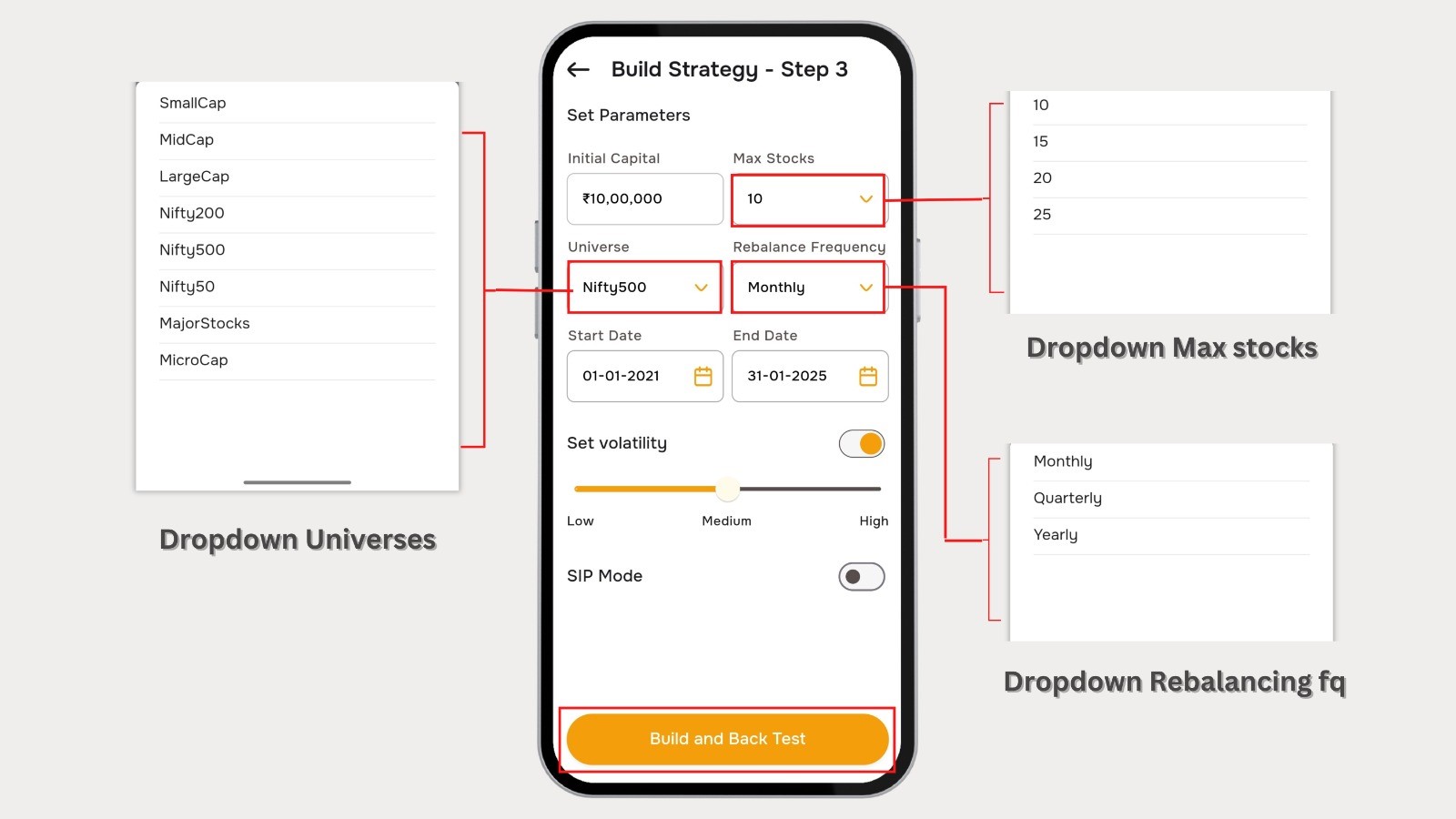
- Initial Capital[cite: 41]
- Enter the starting investment amount for the backtest[cite: 41].
- This value represents the total capital allocated for strategy execution[cite: 41].
- Max Stocks[cite: 41]
- Define the maximum number of stocks that will be included in the portfolio[cite: 41].
- The strategy will select up to this number of stocks based on the chosen factors[cite: 41].
- Universe Selection[cite: 41]
- Choose the stock universe from which the strategy will select stocks[cite: 41].
- This determines the pool of stocks eligible for selection[cite: 41].
- Rebalancing Frequency[cite: 41]
- Select how often the portfolio will be rebalanced to adjust holdings[cite: 41].
- More frequent rebalancing may lead to higher transaction costs[cite: 41].
- Start Date & End Date[cite: 41]
- Select the backtest duration by setting a start and end date[cite: 41].
- This period determines the historical timeframe over which the strategy will be tested[cite: 41].
- Set Volatility[cite: 41]
- Adjust the volatility filter using the slider[cite: 41].
- If enabled, this setting ensures stocks are filtered based on their volatility levels[cite: 41].
- Build and Back Test[cite: 41]
- Tap on “Build and Back Test” to execute the strategy based on the selected parameters[cite: 41].
- A loading animation will appear while the backtest runs[cite: 41].
Step 6 : Backtested Results Page

The Results Page offers a comprehensive overview of backtesting outcomes, enabling users to analyze the performance of their selected strategies[cite: 41]. Key components include Test Results Overview, Equity Curve, Winning & Losing Trades, and Trade Details[cite: 41].
- Tap on “Go To Trade Details” to access the trade details[cite: 41].
- Displays all active trades with entry price & date, current price & date, and percentage change[cite: 41].
- Past performance Summarizes returns over various periods[cite: 41].
Final Thoughts
The Backtester on Boss Investor empowers users to build and refine investment strategies using the Value Factor[cite: 41]. By systematically selecting entry, hold, and exit criteria, setting key parameters, and analyzing backtest results, investors can make data-driven decisions to enhance their portfolios[cite: 41]. Start testing today and optimize your strategy for better returns![cite: 41]
BossInvestor is a SEBI Registered Research Analyst (INH000024143). Results shown are based on historical data and do not guarantee future performance[cite: 41].
Frequently Asked Questions
What are the limitations of relying on historical data when configuring a value investing backtester for Indian stocks?
Relying on historical data via a value investing backtester presents structural challenges because past financial metrics do not account for sudden regulatory shifts, changes in SEBI mandates, or macroeconomic shocks unique to India[cite: 41]. Historical results assume flawless liquidity and execution, whereas smaller caps listed on the NSE or BSE might encounter severe liquidity constraints or wide bid-ask spreads in live environments[cite: 41]. Additionally, corporate governance dynamics and sudden management transformations that alter fundamental quality cannot be captured through historical quantitative filters alone[cite: 41].
How does rebalancing frequency affect transaction costs and taxation within an Indian equity backtest?
Rebalancing frequency severely affects the net returns of an Indian equity portfolio because each trade triggers transaction frictions and statutory leakages[cite: 41]. Frequent adjustments, such as weekly or monthly portfolio shifts, incur higher brokerage fees, exchange transaction charges, SEBI turnover fees, and Goods and Services Tax[cite: 41]. Furthermore, selling profitable Indian equities in less than twelve months attracts Short-Term Capital Gains tax at a higher rate compared to Long-Term Capital Gains tax, which materially erodes compounding efficiency relative to the raw performance simulated inside the backtester[cite: 41].
Why is the momentum factor permanently integrated alongside the value investing backtester in this platform?
The momentum factor is permanently integrated alongside the value factor to mitigate the classic valuation risk known as a value trap[cite: 41]. Pure value investing often targets stocks that are fundamentally cheap but lack an immediate catalyst, causing capital to remain stagnant for multi-year periods[cite: 41]. By combining momentum, which filters for strong price velocity and positive structural direction, with deep value parameters, the platform helps ensure that selected undervalued equities display established upward market interest before they enter a live model portfolio[cite: 41].
What parameters should an investor adjust to filter out highly illiquid small-cap stocks during historical simulation?
To eliminate highly illiquid small-cap stocks from an equity simulation, an investor should carefully adjust the universe selection parameter to broad, highly liquid indices like the Nifty 200 or Nifty 500[cite: 41]. Additionally, activating and configuring the volatility filter slider ensures that extreme, speculative price movements characteristic of low-volume penny stocks are controlled[cite: 41]. Restricting the maximum stocks parameter also forces the quantitative system to allocate capital exclusively to higher-ranked, institutional-grade equities that satisfy strict valuation thresholds[cite: 41].
Can discount factors like DCF and ROE parameters be customized simultaneously when running historical tests?
Simultaneous customization of Discounted Cash Flow valuations and Return on Equity parameters is fully supported by utilizing the distinct dropdown menus provided within the entry criteria panel[cite: 41]. An investor can construct an advanced multifactor strategy by selecting valuation based on DCF under one configuration filter and layering valuation based on ROE under another[cite: 41]. This dual-layered strategy filters the structural universe for companies that are simultaneously undervalued relative to intrinsic cash flows and highly efficient at generating corporate profitability[cite: 41].
Related Blogs

Biocon Shares Jump 6% on Volume Breakout & Biosimilars Growth
Published: Thu Jul 16 2026Read more…

SBI Funds Management IPO Closes: ₹11,693 Cr Issue Sets Record
Published: Thu Jul 16 2026Read more…

Alok Industries Q1 FY27 Results Board Meeting Today
Published: Thu Jul 16 2026Read more…

ITC Hotels Slips 5% Despite 36% Jump in Q1 Net Profit
Published: Fri Jul 17 2026Read more…